With over a billion active users, Instagram has become a heaven for marketers and influencers alike. Instagram provides brands with an option to connect with legit influencers who have dedicated fans. It’s far better for niche marketing than a medium such as TV. In return, it provides influencers with a platform to stay connected to their fans and make money by promoting products. Instagram also comes packed with features that are helpful for everyone. However, that doesn’t mean the platform is flawless. There are some missing features, and for me, the biggest missing feature is the ability to schedule your posts. The timing of a post plays a big role in the performance of the said post. And if you don’t want to miss out on opportunities, you should learn to schedule posts. Well, in this article, we are going to show you how you can schedule Instagram posts using Combin Scheduler.
Use Combin Scheduler to Schedule Instagram Posts and Stories
Before we get to our tutorial, let’s first learn a little about the tool that we are going to use to schedule posts on Instagram. It’s called, Combin Scheduler and it’s one of the best third-party tools for Instagram influencers and would-be influencers. Apart from bringing a robust post scheduling tool, Combin also brings other tools that can help you enhance your reach and connect with more fans and followers. But we will talk about them later. For now, we are going to focus on Combin Scheduler which lets us schedule posts, create dozens of stories in one-click, and create beautiful Instagram grid layouts. With that said, let’s get to our tutorial, shall we?
Steps to Follow
The first step is to download and install Combin Scheduler (links above and below) on your computer. Once installed, launch the app and login with your Instagram account. Now, follow the steps to schedule your first post.
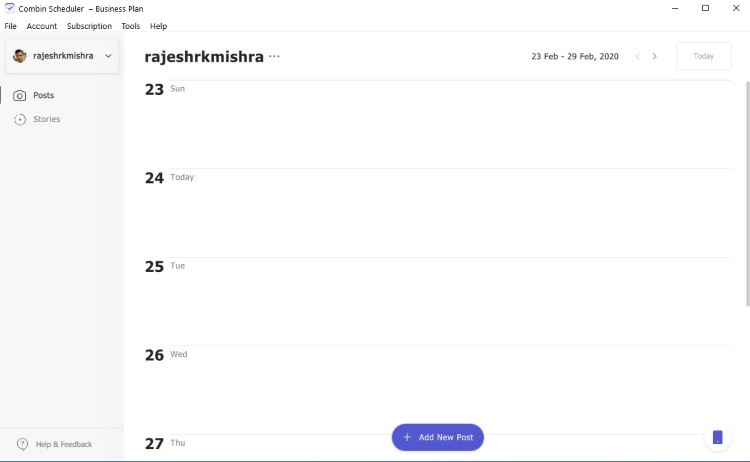
1. First, click on the “Add New Post” button on the app.
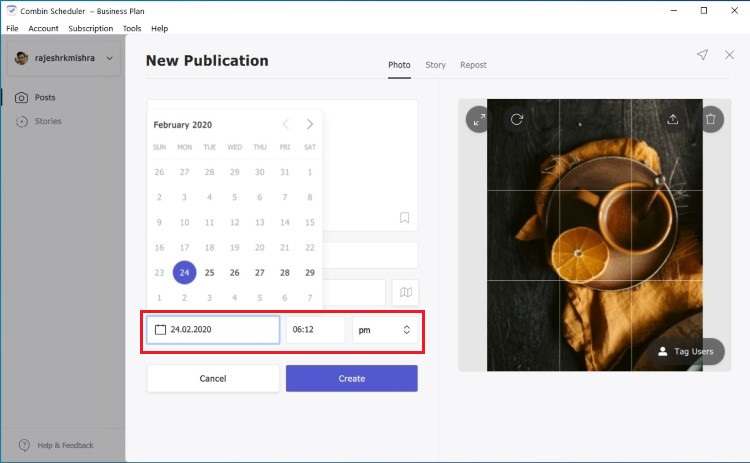
2. Now, upload the photo that you want to post and enter caption and links as per your requirement. Now, click on the date and time fields to schedule the post. Finally, click on the “Create” button to schedule the post.
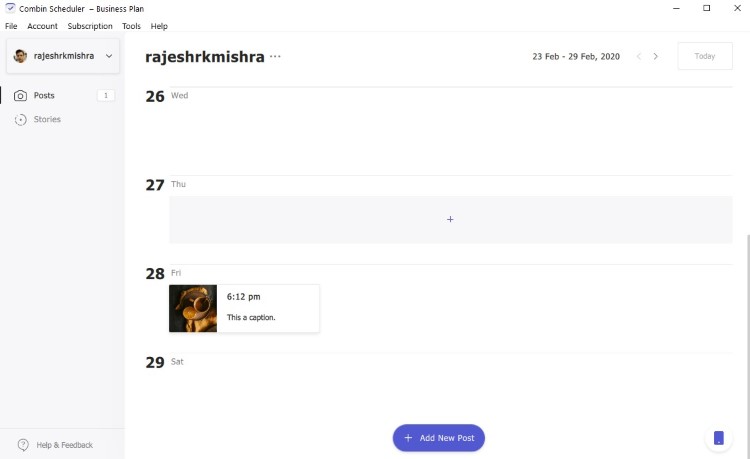
3. The post will now be visible on the homepage as shown in the picture below.
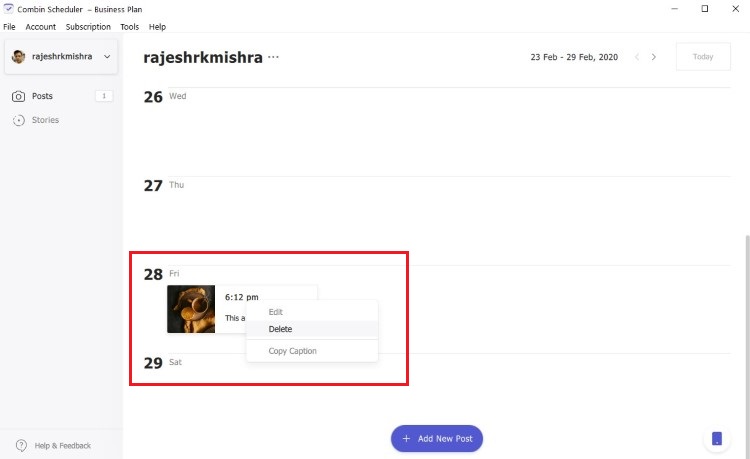
4. For deleting the scheduled post, right-click on the post and select the “Delete” option.
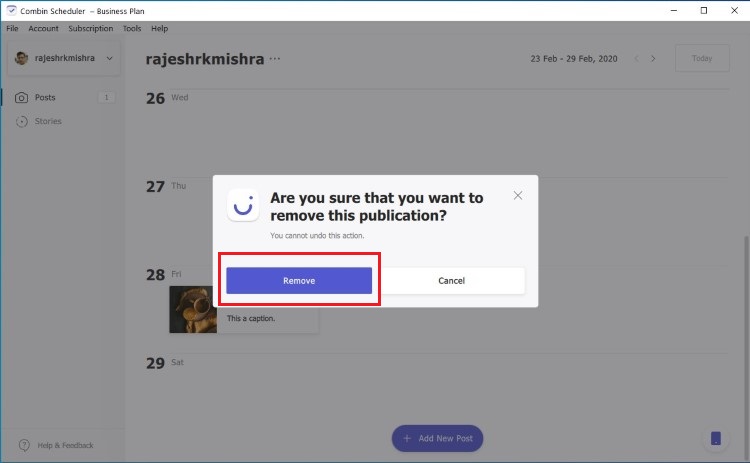
5. Click on the “Remove” button to authenticate the deletion of the post.
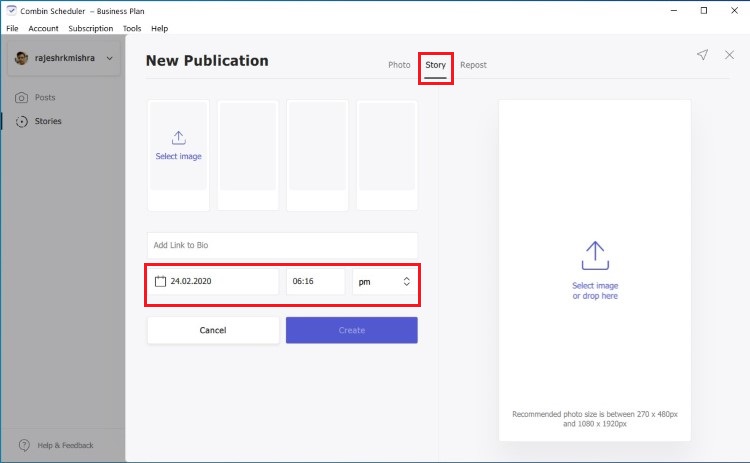
6. The process of scheduling and deleting stories is also the same. Just make sure to select the “Story” tab as shown in the picture below.
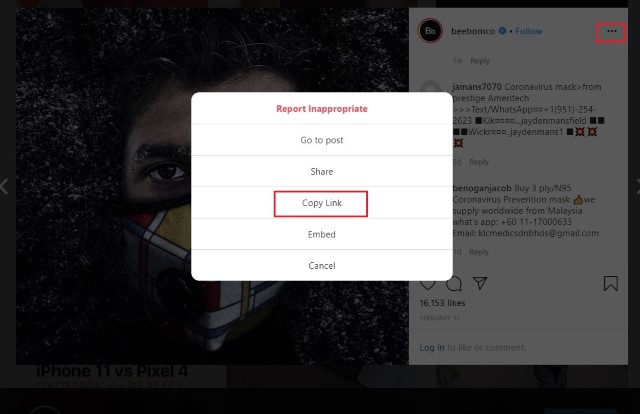
7. Similarly, you can easily repost posts on Instagram using Combin Shceduler’s repost feature. To do that open any post on Instagram and copy it’s link by using the three-dot menu.
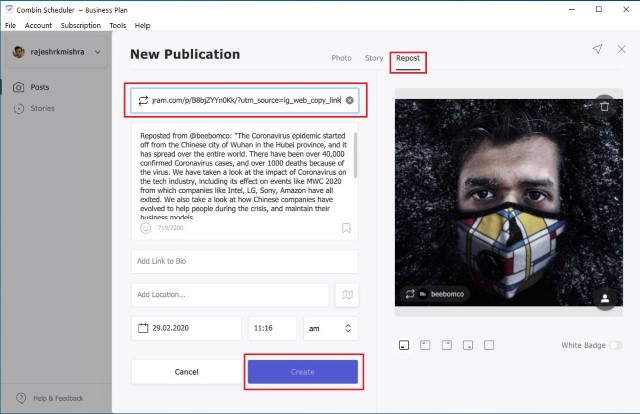
8. Now, click on the “Repost” tab and paste the copied link. It will automatically pull the post. Edit the details as you want and then click on the “Create’ button to repost.
So, that’s how you can easily schedule posts and stories on Instagram and repost posts using Combin Scheduler. If you are impressed by its prowess, you should also check out its sibling tool — Combin Growth. The Growth tool lets you unfollow Instagram users who are not following you back, check your Instagram audience quality, find the target audience, track your posts’ performance, monitor audience activity and growth, and more. Together, the Combin Scheduler and Combin Growth can improve your Instagram game by a mile.
Pricing and Availability
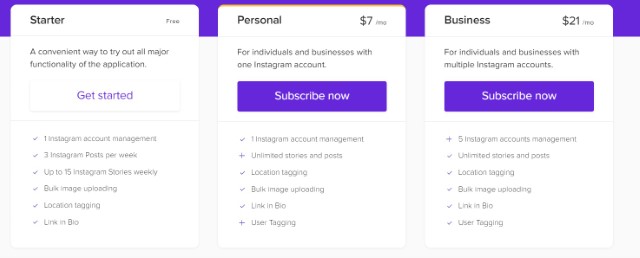
As you can see, Combin Scheduler makes it super easy to schedule posts and stories on Instagram. I also love that it allows you to schedule multiple posts and stories without any hiccups. Also, the calendar view of the homepage makes it easy to check and manage your schedules posts. Combin Scheduler is available as a desktop application and is available for all three major desktop platforms; Windows, macOS, and Linux. The app comes with a free “Starter” version that lets you manage 1 Instagram account with limitations. If you like what you find, you can get one of the paid plans. The personal paid plans start at $7/month. You can also buy the Combin Growth for $10/month.
Schedule Instagram Posts Like a Pro with Combin
Combin Scheduler is one of the best Instagram scheduler tools that I have tested in a while. Not only it makes it super-easy to schedule posts and stories but it also lets you easily visualize your plans and manage scheduled posts. Also, since Combin Scheduler offers a free version, I don’t think there is any harm in checking it out. So, install Combin Scheduler and let us know your experiences by writing in the comments section below.
Visit Combin to check out Combin Scheduler and Combin Growth
Comments
Post a Comment