
Apple Maps Redesign Starts Rolling out in the US

Apple Maps Redesign Starts Rolling out in the US

Apple has started rolling out its redesigned Apple Maps with a whole bunch of new features for users in the US. The update includes major improvements including better road coverage, real-time transit details, and improved navigation.

Starting today, Apple Maps will show more detailed and accurate views of roads, buildings, parks, airports, malls, and more physical entities. Two noteworthy new additions to Apple Maps are Look Around and Collections.

Apple announced Look Around back in WWDC 2019 keynote. In case you’re unaware, Look Around is the Cupertino giant’s take on street-level imagery, similar to what Google Maps offers with its Street View. Look Around currently supports select cities including New York City, the San Francisco Bay Area, Los Angeles, Las Vegas, Houston, and Oahu. More cities will be added later.
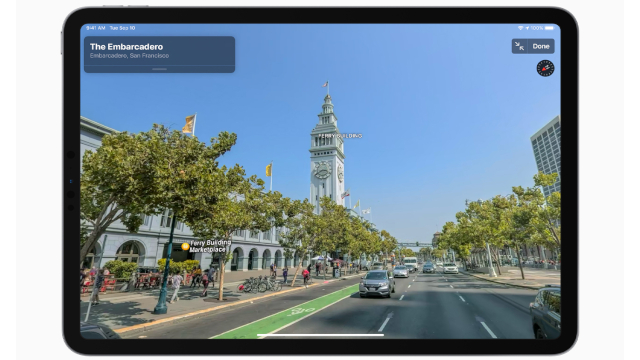
apple maps look around
Apple Maps Look Around (Credits: Apple)

On the other hand, Collections lets Apple Maps users create and share lists of places on the map, say a place you’re interested to visit or your favorite tourist spots. Users also get quick access to frequently visited places with Favorites section.
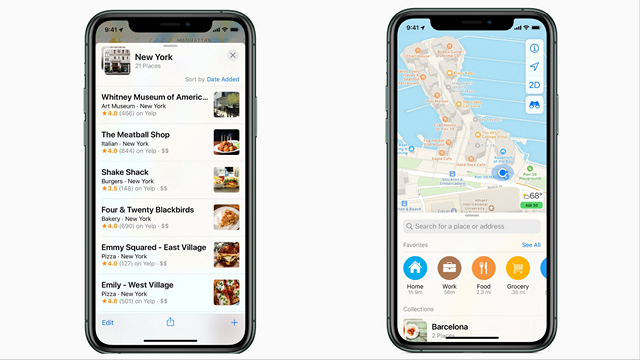
Apple Maps Collections and Favorites
Collections (left) &  Favorites (right) (Credits: Apple)

The update also adds real-time transit details with transit schedules, live departure times, arrival times, the current location of a bus or train. However, the feature is limited to the San Francisco Bay Area, Washington D.C., New York, Los Angeles, and Miami for now.

Other new features include the ability to share ETA with your loved ones, view flight status, indoor maps for airports and malls, improved Siri voice guidance during navigation, and 3D views for flyovers.

Now that Apple has completed its redesigned Maps interface rollout in the U.S, the company aims to achieve the same in Europe in the coming months. So, what do you think of the redesigned Apple Maps? Let us know in the comments.

Comments

Popular posts from this blog

iPhone 12 to Have 5nm Processor, Qualcomm’s X55 5G Modem: Report

Apple is all set to launch its first 5G iPhones next year, and a new report out of Japan now claims that they will ship with Qualcomm’s X55 5G modem under-the-hood. According to multiple sources quoted by the Nikkei Asian Review , at least three of the devices the company will launch next year, will ship with 5G connectivity. “It will be the first time Apple introduces 5G iPhones … There will be three of them and the company has set an aggressive sales target” , said one of them. As per the report, the next-gen iPhone lineup will be powered by the A14 chip that will use the 5nm technology, making it significantly more power efficient than its predecessor, the A13 Bionic, found on the current-gen iPhone 11 lineup. At least two of the three new phones will also have what the report called ‘flexible’ OLED displays, although it’s not immediately clear what it meant by that term. In addition, Apple is also developing a new ‘3D-sensing rear-camera’ that is said to be able to “sense t...

Windows 10 Insider Build 19013 Adds Power Toys, New Kaomoji, and More

Microsoft has already pushed the near-final release version of the Windows 10 November 2019 Update and is now focusing its efforts on the next major 20H1 update. We’ve been keeping track of the new features being tested with Insiders for some time now and well, the latest build, number 19013, brings improvements to the Linux subsystem, emoji tray, and Your Phone features. The highlights of Insider Build 19013 is the return of Power Toys. They’re special utilities that were made popular in the Windows 95 and Windows XP era, but had been nixed to make way for new features over the past few years. Well, they’ve now made a return to Windows 10 20H1 Insider builds this month, starting with 2 features, PowerRename and FancyZones. While PowerRename makes it possible for users to rename files in bulk, the FancyZones feature lets you drag apps into defined target positions on your PC. You can take a close look at the FancyZones feature right here . Apart from this, the Windows subsystem f...

Samsung Launches Galaxy Labs; an App Suite to Help Optimize Your Phone

Though OneUI 2 is set to bring along a number of changes to Samsung’s Galaxy phones, the company has today released a new suite of device optimization apps. Dubbed Galaxy Labs, it’s offering users access to 4 apps, including a file restoration app, battery tracker and optimizer, and an app booster. All of these four apps live under Galaxy Labs, similar to the “Device Care” feature on the company’s OneUI-powered devices. Let’s talk about each service under this app, starting with File Guardian. It’s going to serve as one of the most used and important apps in the Galaxy Labs suite as it will help recover permanently deleted files from your internal, as well as external storage. Next up, we have Battery Tracker and Battery Guardian apps. The name of these 2 apps are enough to tell you what they do. While the former gives you an in-depth look at the device’s battery usage (more detailed in comparison to the in-built battery tracker), the latter only checks if existing battery optimiza...