ProtonMail Launches Its Encrypted Calendar in Open Beta

ProtonCalendar launched in beta by ProtonMail

One of the best encrypted email services, ProtonMail is giving privacy enthusiasts another reason to switch to their encrypted platform. It already safeguards your mails from prying eyes (unlike other technology giants) and you can now also keep your calendar events to yourself. Proton had been talking up its calendar product for quite some time and it’s finally here.

ProtonCalendar, as it’s called, made its official debut on Monday to offer users an end-to-end encrypted alternative to Google Calendar. It essentially comes as a replacement for all calendar apps since it’s the first fully encrypted one – which makes it appealing to a lot of privacy-conscious users.

The calendar feature is currently in beta and accessible only to paid ProtonMail users. The company intends to test out the calendar and iron out the kinks before making it available to all next year. Also, the feature is only available on the web version of the platform. You will have to wait until 2020 to be able to use the feature on iOS and Android.

If you are a paid user, you should see a new “ProtonCalendar” icon in the sidebar – below your address book. ProtonMail didn’t set out to reinvent your calendar and it hasn’t. The ProtonCalendar is solely meant to be more secure and keep your data private – even the company cannot see the events you create because the calendar is now encrypted. It’s using the same end-to-end encryption that ProtonMail does to ensure no one can access the details except you.

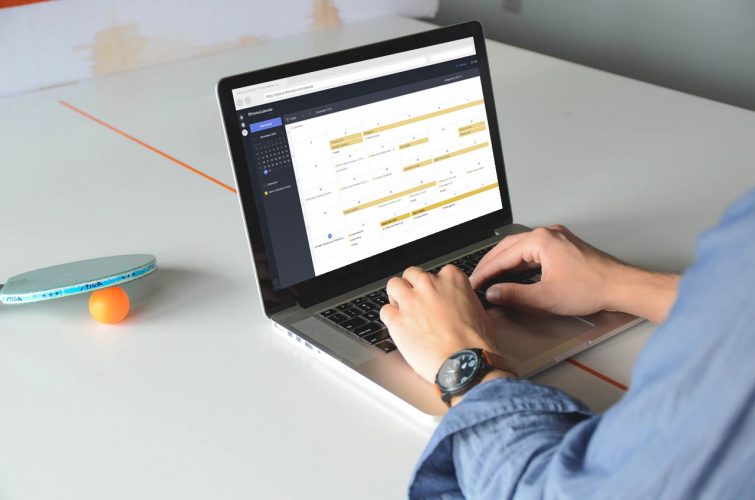
As you can see in the tweet above, ProtonCalendar looks like any other calendar app that you may have used in the past. It boasts a clean interface with a day, week, and months view and enables you to add color-coded events. I haven’t tested out the service myself, however, the event addition/editing pane looks familiar and users can switch without any hassles.

ProtonCalendar differentiates itself but putting privacy ahead of its features set, which it can continue to perk up in the months before an official public release. In its official blog post, ProtonMail mentions, “Our calendar stops private companies from spying on your schedule. For our users with heightened security needs, ProtonCalendar will prevent authoritarian regimes from seeing who you are meeting with and what you are doing.”

So, if you are a ProtonMail user with a paid plan, you should go ahead and test out the ProtonCalendar feature right away.

Comments

Popular posts from this blog

iPhone 12 to Have 5nm Processor, Qualcomm’s X55 5G Modem: Report

Apple is all set to launch its first 5G iPhones next year, and a new report out of Japan now claims that they will ship with Qualcomm’s X55 5G modem under-the-hood. According to multiple sources quoted by the Nikkei Asian Review , at least three of the devices the company will launch next year, will ship with 5G connectivity. “It will be the first time Apple introduces 5G iPhones … There will be three of them and the company has set an aggressive sales target” , said one of them. As per the report, the next-gen iPhone lineup will be powered by the A14 chip that will use the 5nm technology, making it significantly more power efficient than its predecessor, the A13 Bionic, found on the current-gen iPhone 11 lineup. At least two of the three new phones will also have what the report called ‘flexible’ OLED displays, although it’s not immediately clear what it meant by that term. In addition, Apple is also developing a new ‘3D-sensing rear-camera’ that is said to be able to “sense t...

Windows 10 Insider Build 19013 Adds Power Toys, New Kaomoji, and More

Microsoft has already pushed the near-final release version of the Windows 10 November 2019 Update and is now focusing its efforts on the next major 20H1 update. We’ve been keeping track of the new features being tested with Insiders for some time now and well, the latest build, number 19013, brings improvements to the Linux subsystem, emoji tray, and Your Phone features. The highlights of Insider Build 19013 is the return of Power Toys. They’re special utilities that were made popular in the Windows 95 and Windows XP era, but had been nixed to make way for new features over the past few years. Well, they’ve now made a return to Windows 10 20H1 Insider builds this month, starting with 2 features, PowerRename and FancyZones. While PowerRename makes it possible for users to rename files in bulk, the FancyZones feature lets you drag apps into defined target positions on your PC. You can take a close look at the FancyZones feature right here . Apart from this, the Windows subsystem f...

“Call of Duty: Mobile” Is Finally Available for Everyone to Play

One of the biggest and most popular video game franchises is finally available on mobile devices. After announcing it at its GDC 2019 keynote earlier in the year, Activision has finally brought its super-popular FPS franchise, Call of Duty , to Android and iOS. The game has been released in most countries around the world simultaneously, including India. Called ‘Call of Duty: Mobile’ , the free-to-play game is developed by Tencent’s Timi studio and, involves maps, modes, weapons and characters from across the CoD universe, including the Black Ops  and the  Modern Warfare  series. On Android, it weighs in at 74MB and is compatible with Android 4.3 Jelly Bean and above, while on iOS, it is a massive 1.5GB, and requires iOS 9.0 or later. The game will be available only in the multiplayer mode and, will include classic maps, such as Nuketown, Crash and Hijacked. According to the game’s listing pages on the Play Store and the App Store, players can expect 10-player free-fo...