Microsoft Edge Beta on Android Gets Revamped ‘Control Center’

microsoft edge control center redesign

Having been originally envisaged as a Internet Explorer replacement in Windows, Microsoft Edge has become a fairly popular web-browser on not only desktops, but also on mobile platforms with more than 10 million downloads on Android alone. The app has also gained a plethora of new features like the dark mode support, and ad blocking, since it was originally released on the platform, and the latest beta release (version 44.11.24.4109) now brings a new Control Center that simplifies the process of customising the browser by combining multiple settings options under one roof.

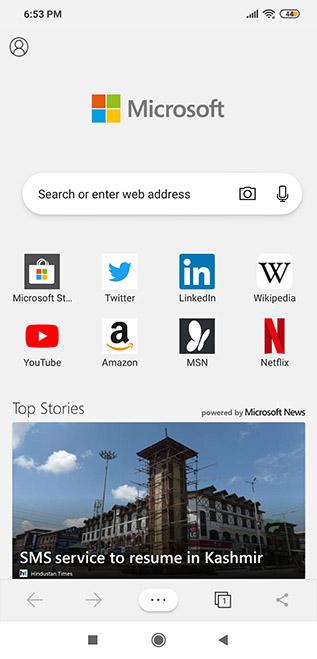
As noted by OnMSFT, the new UI is turned on by default in the latest beta for all users after being extensively soak-tested over the past few weeks. The first thing you’ll notice is the redesigned navigation bar (at the bottom) that now has the ‘Control Center’ button at the middle replacing the ‘Continue on PC‘ button, which has been banished from the panel altogether. Instead, there’s now a ‘Share’ button on the far right to fill up the vacant place.
edge control center ui

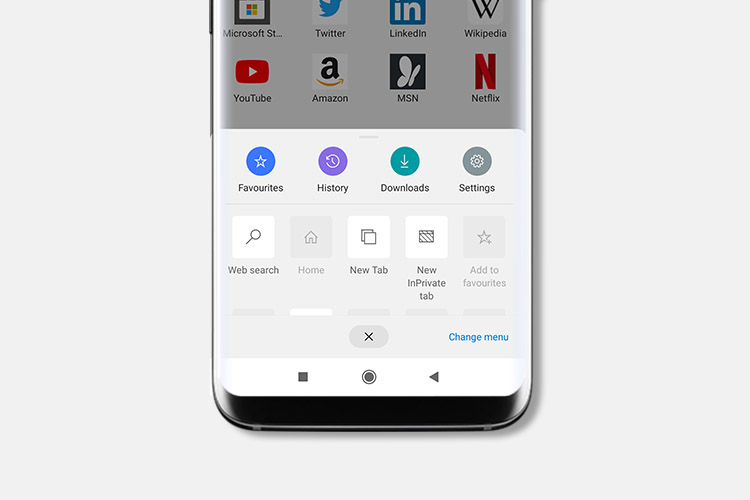
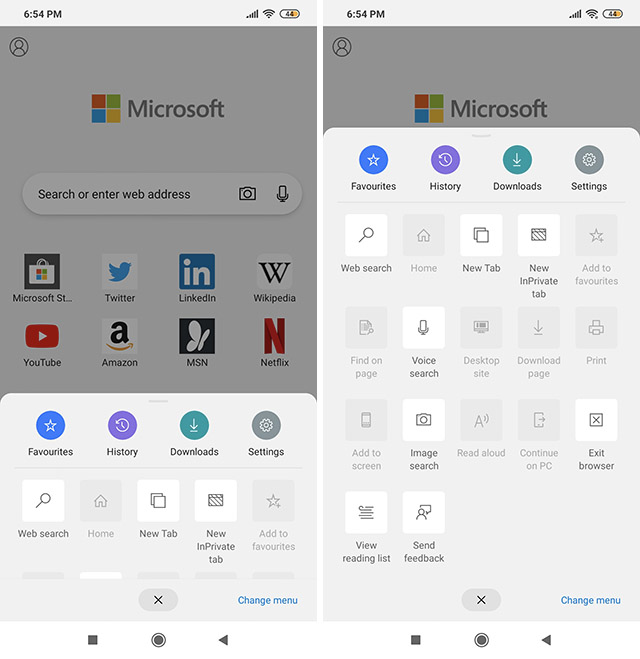
As for the new Control Center interface, it can be accessed by tapping on the ellipsis menu (…) at the center of the revamped navigation bar at the bottom. Tapping on that will bring up the new shortcut panel that can then be pulled up using gesture navigation much the same way as the Quick Settings panel needs to be pulled down from the top edge of the screen on Android devices.
edge control center ui expanded

What you’ll find is that you can drag and drop various shortcuts to create your own customized UI on the panel, so that the options you use the most can be placed on the top row(s) for easy access. While the original row including Favorites, History etc. cannot be customized, users will be able to add any number of other options in the subsequent rows.

In addition, there are a few relatively minor changes as well, including slightly rounded corners of the search box on the default home page, while the profile icon is now front and center on the top-left rather than being buried under a menu. While the changes seem relatively minor, they will likely make the browser more convenient for regular users.

Comments

Popular posts from this blog

iPhone 12 to Have 5nm Processor, Qualcomm’s X55 5G Modem: Report

Apple is all set to launch its first 5G iPhones next year, and a new report out of Japan now claims that they will ship with Qualcomm’s X55 5G modem under-the-hood. According to multiple sources quoted by the Nikkei Asian Review , at least three of the devices the company will launch next year, will ship with 5G connectivity. “It will be the first time Apple introduces 5G iPhones … There will be three of them and the company has set an aggressive sales target” , said one of them. As per the report, the next-gen iPhone lineup will be powered by the A14 chip that will use the 5nm technology, making it significantly more power efficient than its predecessor, the A13 Bionic, found on the current-gen iPhone 11 lineup. At least two of the three new phones will also have what the report called ‘flexible’ OLED displays, although it’s not immediately clear what it meant by that term. In addition, Apple is also developing a new ‘3D-sensing rear-camera’ that is said to be able to “sense t...

MediaTek to Design More Chipsets in India After Helio G90

Taiwanese fabless semiconductor company, MediaTek, is all set to bring its gaming-focused ‘Helio G90’ chipset series to India in partnership with Chinese tech major, Xiaomi. According to a senior MediaTek executive, the entire design, SoC integration and gaming software of the MediaTek Helio G90 series have been designed and developed at the company’s R&D facility in Bengaluru. Speaking to IANS, the General Manager of MediaTek India, Rituparna Mandal, said that the company is also working towards designing more smartphone processors in India going forward. “There are many more smartphone chips in the pipeline aimed to be designed in India. To do that, you need the right engineering talent and leadership. That’s where the investment comes – in hiring the right talent to grow the design teams to be able to work on the chips” , she said. The Helio G90 chip, which Mandal said took around six months to design, is slated to debut in India next month as part of a partnership between M...

Windows 10 Insider Build 19013 Adds Power Toys, New Kaomoji, and More

Microsoft has already pushed the near-final release version of the Windows 10 November 2019 Update and is now focusing its efforts on the next major 20H1 update. We’ve been keeping track of the new features being tested with Insiders for some time now and well, the latest build, number 19013, brings improvements to the Linux subsystem, emoji tray, and Your Phone features. The highlights of Insider Build 19013 is the return of Power Toys. They’re special utilities that were made popular in the Windows 95 and Windows XP era, but had been nixed to make way for new features over the past few years. Well, they’ve now made a return to Windows 10 20H1 Insider builds this month, starting with 2 features, PowerRename and FancyZones. While PowerRename makes it possible for users to rename files in bulk, the FancyZones feature lets you drag apps into defined target positions on your PC. You can take a close look at the FancyZones feature right here . Apart from this, the Windows subsystem f...