Google Just Randomly Stopped Showing Search Results to Some Users

Google is probably the most visited website in the planet. It’s almost everyone’s home page, it’s Alexa rank is 1, it’s also basically the world’s knowledge database. The website took Search and became such a popular starting point for finding any information online that the word “Google” became a verb.

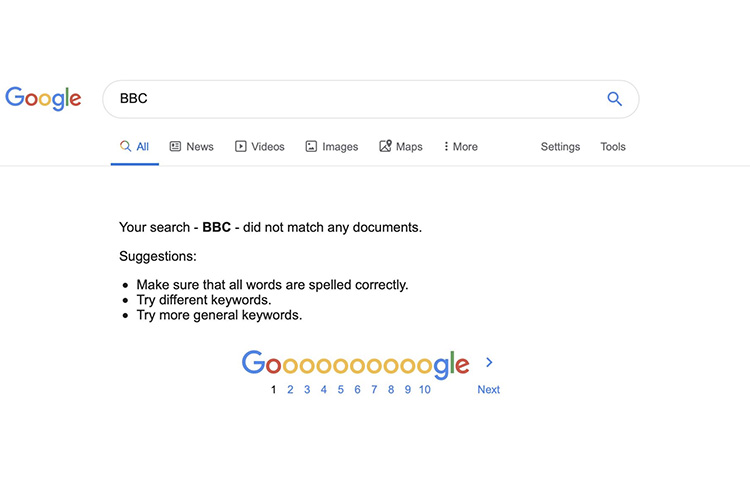
Now imagine waking up one day, and realising that you’re not getting any results when searching on Google, and I mean any results at all. That’s exactly what was happening to a bunch of visitors to the Google search website yesterday, according to reports on Twitter, and complaints on the Google Web Search Help forum.

The issue resulted in any query entered into the search box on Google returning the error message that the query “did not match any documents.” Some reports mentioned that clearing cache, or signing out and back into their Google accounts solved the issue for them, while others mentioned that clearing the browsing history solved the problem for them.

Danny Sullivan from Google responded to people’s concerns and complaints saying “Hello everyone. I work for the search team at Google. We are looking into this, to understand better and get it resolved, soon. It’s been helpful those who have shared specifics about what seems to trigger it. The more details you can share, the better for us to track this down.”

He later mentioned that the problem was “impacting a small number of users” and that the company was “actively investigating it and [expected] to have it solved soon.” However, when your user-base is in billions, a “small number of users” is generally not small. 

Fortunately, Danny Sullivan later tweeted that the company believes the issue has been resolved. If you were encountering the issue, it should’ve been fixed now, and if not, head over to the Google Web Search Help thread about the problem.

Featured image courtesy: Stephen Fry (Twitter)

Comments

Popular posts from this blog

iPhone 12 to Have 5nm Processor, Qualcomm’s X55 5G Modem: Report

Apple is all set to launch its first 5G iPhones next year, and a new report out of Japan now claims that they will ship with Qualcomm’s X55 5G modem under-the-hood. According to multiple sources quoted by the Nikkei Asian Review , at least three of the devices the company will launch next year, will ship with 5G connectivity. “It will be the first time Apple introduces 5G iPhones … There will be three of them and the company has set an aggressive sales target” , said one of them. As per the report, the next-gen iPhone lineup will be powered by the A14 chip that will use the 5nm technology, making it significantly more power efficient than its predecessor, the A13 Bionic, found on the current-gen iPhone 11 lineup. At least two of the three new phones will also have what the report called ‘flexible’ OLED displays, although it’s not immediately clear what it meant by that term. In addition, Apple is also developing a new ‘3D-sensing rear-camera’ that is said to be able to “sense t...

Lenovo IdeaPad Slim 5i Review: A Powerful Workhorse

It’s been quite some time since Intel announced its 11th-gen laptop processors, complete with the new logo design and Intel Iris Xe graphics. And yet, so far I’ve not gotten my hands on a laptop packing the new processor and iGPU. That all changed when Lenovo sent over the IdeaPad Slim 5i (Rs. 61,990) with […] The article Lenovo IdeaPad Slim 5i Review: A Powerful Workhorse was first published on Beebom

Windows 10 Insider Build 19013 Adds Power Toys, New Kaomoji, and More

Microsoft has already pushed the near-final release version of the Windows 10 November 2019 Update and is now focusing its efforts on the next major 20H1 update. We’ve been keeping track of the new features being tested with Insiders for some time now and well, the latest build, number 19013, brings improvements to the Linux subsystem, emoji tray, and Your Phone features. The highlights of Insider Build 19013 is the return of Power Toys. They’re special utilities that were made popular in the Windows 95 and Windows XP era, but had been nixed to make way for new features over the past few years. Well, they’ve now made a return to Windows 10 20H1 Insider builds this month, starting with 2 features, PowerRename and FancyZones. While PowerRename makes it possible for users to rename files in bulk, the FancyZones feature lets you drag apps into defined target positions on your PC. You can take a close look at the FancyZones feature right here . Apart from this, the Windows subsystem f...